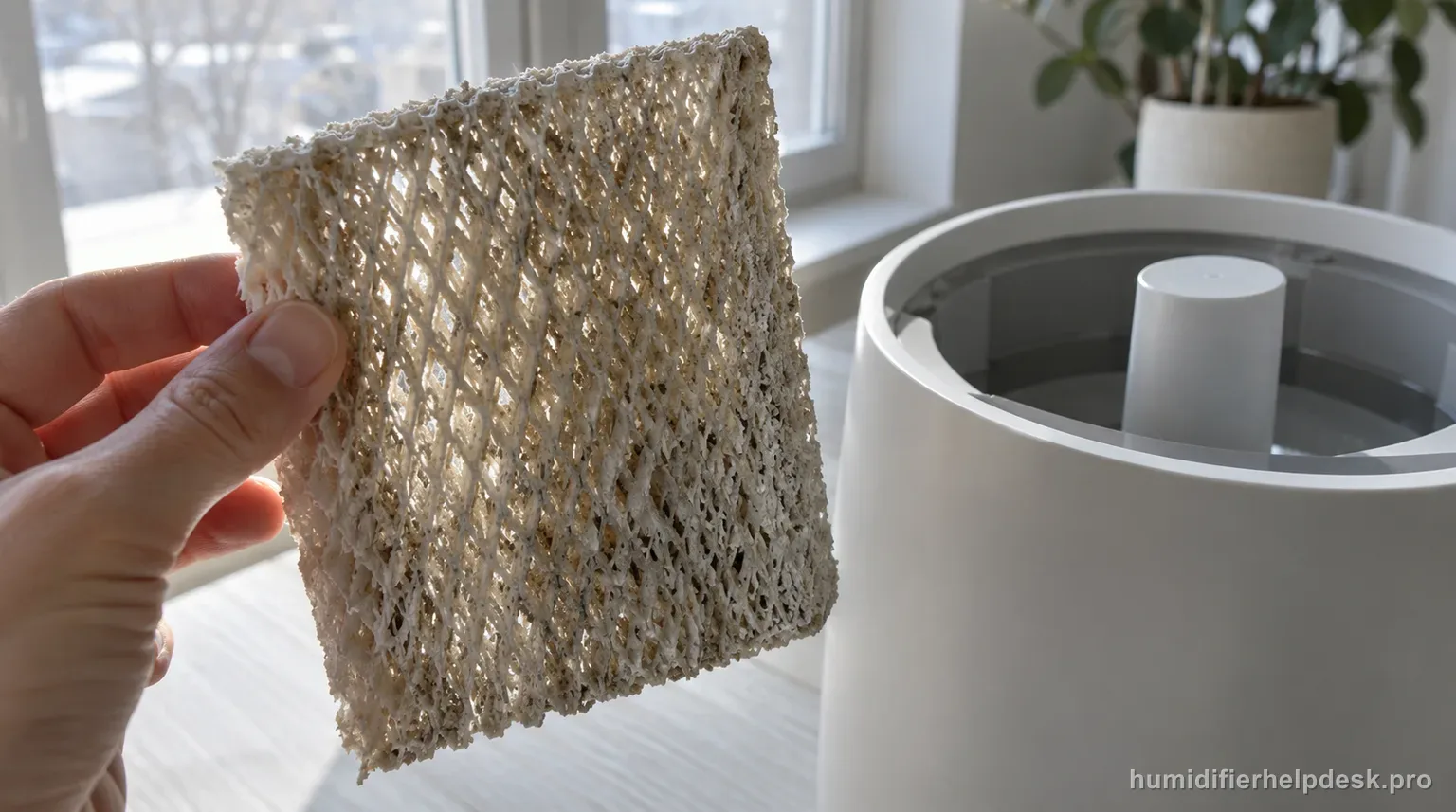
Mineral-loaded or poorly maintained wick media can reduce output. Blueair recommends routine cleaning and replacement based on condition and use.
Does this match what you are seeing?
Owners describe this Blueair DreamWell 1 Gal / 2 Gal problem in a few different ways. If one of these sounds like yours, this guide covers it:
- Wick filter problem
- Filter hard or crusty
- Wick not getting wet
- Filter smells or looks dirty
Check these in order
- Disconnect power before removing the wick.
- Clean the wick weekly when needed; the DreamWell mesh wick can be machine washed on a gentle cycle.
- For mineral buildup, use Blueair’s citric-acid soak guidance and rinse thoroughly.
- Replace the wick when cleaning no longer restores performance; Blueair gives a broad 6–12 month replacement range depending on use.
Diagnostic decision path
Low DreamWell output is often a wick-condition problem before it is an electronics problem. Blueair's updated guidance says to clean the wick regularly; the mesh fabric wick can be machine washed on gentle, and mineral buildup can be treated with a citric-acid soak of 20 g per 1 L of water for about 1 hour, up to 2 hours if needed. Replacement is condition/use dependent, broadly around 6–12 months.
- Turn the humidifier off and disconnect power before removing the wick.
- Check whether low output occurs on a manual fan setting with adequate water, so Auto standby is not confused with wick restriction.
- Inspect for mineral crusting, poor wetting, deformation, or a wick that no longer rebounds after cleaning.
If: The wick is dirty but still structurally sound
What it means: Routine cleaning may restore airflow and evaporation.
Do next: Clean the DreamWell mesh wick using the supported gentle-wash method, rinse as appropriate, reinstall, and retest.
If: Mineral scale is the dominant buildup
What it means: Hard-water deposits can reduce wetting and evaporation.
Do next: Use Blueair's citric-acid ratio of 20 g/L for about 1 hour, up to 2 hours if needed, then rinse thoroughly before reinstalling.
If: Output returns after cleaning
What it means: Wick loading was the limiting factor.
Do next: Keep a regular cleaning schedule; Blueair recommends frequent cleaning for performance, especially with regular use.
If: The wick remains stiff, damaged, or low-output after proper cleaning
What it means: The media may be past useful service life.
Do next: Replace it with the correct DreamWell wick rather than increasing chemical strength or scraping the media.
If: A clean/replaced wick, adequate water, and manual fan still produce very low output
What it means: Wick condition no longer explains the symptom.
Do next: Move to pump/connector and room-humidity diagnostics, then Blueair support if those checks pass.
How to interpret the retest
Make this one change, then compare the result with the original state. Check “Disconnect power before removing the wick” on the Blueair DreamWell 1 Gal / 2 Gal, then look specifically for “The wick is dirty but still structurally sound”. A match supports the manual's interpretation “Routine cleaning may restore airflow and evaporation” and sends you to “Clean the DreamWell mesh wick using the supported gentle-wash method, rinse as appropriate, reinstall, and retest”. If the observation is missing, that result narrows the Blueair DreamWell 1 Gal / 2 Gal dirty wick or low output diagnosis without jumping to an unrelated reset.
Use “Mineral scale is the dominant buildup” to narrow the next check without turning one observation into a definitive diagnosis. On the Blueair DreamWell 1 Gal / 2 Gal, it corresponds to “Hard-water deposits can reduce wetting and evaporation”. Use “Clean the wick weekly when needed; the DreamWell mesh wick can be machine washed on a gentle cycle” and retest. When the observation is present, continue with “Use Blueair's citric-acid ratio of 20 g/L for about 1 hour, up to 2 hours if needed, then rinse thoroughly before reinstalling”. When it is absent, rule out that explanation for now and keep the result with the current Blueair DreamWell 1 Gal / 2 Gal dirty wick or low output notes.
Make this the first check: “For mineral buildup, use Blueair’s citric-acid soak guidance and rinse thoroughly”. With that step complete, compare the Blueair DreamWell 1 Gal / 2 Gal with “Output returns after cleaning”. If the two states match, the source-backed interpretation is “Wick loading was the limiting factor” and then “Keep a regular cleaning schedule; Blueair recommends frequent cleaning for performance, especially with regular use”. If they do not match, leave this Blueair DreamWell 1 Gal / 2 Gal path and continue; that non-match helps rule out this explanation for the dirty wick or low output complaint.
Model-specific context that changes the diagnosis
Separate the first two Blueair DreamWell 1 Gal / 2 Gal causes
Do not merge these first two observations into one diagnosis. When “The wick is dirty but still structurally sound” is true, the Blueair DreamWell 1 Gal / 2 Gal path points to “Routine cleaning may restore airflow and evaporation”; use “Clean the DreamWell mesh wick using the supported gentle-wash method, rinse as appropriate, reinstall, and retest”. When “Mineral scale is the dominant buildup” is the better match, the path changes to “Hard-water deposits can reduce wetting and evaporation”, so use “Use Blueair's citric-acid ratio of 20 g/L for about 1 hour, up to 2 hours if needed, then rinse thoroughly before reinstalling”. Retest one explanation before trying the action tied to the other.
Run the Blueair DreamWell 1 Gal / 2 Gal checks in order
Use a single-variable retest so each correction has a clear result. Test “Disconnect power before removing the wick” first, then inspect the Blueair DreamWell 1 Gal / 2 Gal again. If the behavior persists, use “Clean the wick weekly when needed; the DreamWell mesh wick can be machine washed on a gentle cycle”; save “For mineral buildup, use Blueair’s citric-acid soak guidance and rinse thoroughly” for the next step. That order gives the Blueair DreamWell 1 Gal / 2 Gal dirty wick or low output path a meaningful comparison instead of several changes with no clear cause.
Common mistakes that make this harder to diagnose
- Using stronger acids or longer soaks than Blueair documents to rescue a spent wick.
- Replacing the wick on a calendar alone without considering condition and water hardness.
- Calling invisible evaporative moisture 'low mist' even when water use and room humidity are normal.
The issue is resolved when a cleaned or replaced DreamWell wick wets evenly, airflow is normal, and water use/humidity output recover. Persistent low output after wick, water, pump, and mode checks is the support boundary.
Questions people ask about this exact symptom
Why is my Blueair DreamWell 1 Gal / 2 Gal not raising room humidity as expected?
For the Blueair DreamWell 1 Gal / 2 Gal, mineral-loaded or poorly maintained wick media can reduce output; Blueair recommends routine cleaning and replacement based on condition and use. For this dirty wick or low output check on the Blueair DreamWell 1 Gal / 2 Gal, start with “Disconnect power before removing the wick” and check the result before making another change.
What should I check first if my Blueair DreamWell 1 Gal / 2 Gal does not raise room humidity as expected?
Use the Blueair DreamWell 1 Gal / 2 Gal checklist as an ordered troubleshooting sequence, with one change at a time. Try “Disconnect power before removing the wick”, retest, then move to “Clean the wick weekly when needed; the DreamWell mesh wick can be machine washed on a gentle cycle” and “For mineral buildup, use Blueair’s citric-acid soak guidance and rinse thoroughly” only as required.
When should I contact Blueair about this Blueair DreamWell 1 Gal / 2 Gal problem?
If the Blueair DreamWell 1 Gal / 2 Gal still has the same problem after the manual-supported checks for dirty wick or low output, contact Blueair rather than disassembling the unit. Tell support what changed after the last dirty wick or low output check on the Blueair DreamWell 1 Gal / 2 Gal, and do not bypass any protection or interlock.
Why this path is model-specific
Blueair’s DreamWell wick guidance says the mesh wick is washable, recommends weekly cleaning for performance, and gives a 6–12 month replacement range depending on use.
For the Blueair DreamWell 1 Gal / 2 Gal, the machine type matters: it is evaporative. Its moisture output is not supposed to look like ultrasonic fog, so “I cannot see mist” by itself is not evidence of a failure.
Compare this symptom across verified models
If you are still deciding whether this behavior is normal or model-specific, use the symptom hub to compare only manufacturer-linked guides. Keep the Blueair DreamWell 1 Gal / 2 Gal instructions above as the controlling path for this machine.
If the problem is still there
If the checks above do not change the symptom, use the manufacturer support path for this exact model. We intentionally stop before undocumented resets, sensor bypasses, internal mains work, or parts replacement that the consumer manual does not authorize.
What we do not recommend
Do not defeat a float, water-level sensor, overheat protection, interlock, or other safety feature. Do not open mains-powered sections for live testing. If the unit smells burned, becomes abnormally hot, smokes, sparks, has water near electrical parts, or repeatedly trips a circuit, stop using it and keep clear. Unplug it only if the plug, outlet, and surrounding area are dry and safe to reach; otherwise do not touch wet equipment and contact manufacturer support for next steps.
Primary source for this diagnosis
Source checked during the September 3, 2026 editorial review. Manufacturer documents can change; a material re-review updates this guide’s reviewed date rather than stamping unrelated pages.